
Time Tracking in Notion: Formulas, Properties & Time Blocking
Using Notion for Time Management
There are lots of ways you can use Notion for time tracking. A common implementation I have seen is to add a Notion button for starting and finishing a task, and that, in combination with some basic Notion formula, will populate the total time you have spent working on a task, based on when you hit start and finish. That's great, and can give you the exact amount of time you're spending on a task. However, as someone who uses time blocking to help plan out my day and week, this didn't quite solve time management in Notion for me.
Actual Time and Duration
For context, in my project management system, I primarily use my parent tasks to plan out a project timeline. Each task may take several days to deliver and task X may be dependent on task Y, etc. Planning out a project like this helps me get a more realistic timeline for when a project can be completed. I’ll then divide those parent tasks into different sub-tasks. It’s those sub-tasks that I’ll be working on over a number of hours on a given day.
In my current setup, I use a couple of properties in my task database for time management. This has been designed with the Notion Calendar app in mind. While you can schedule tasks to the minute if you wish, I find the click and drag options in the calendar app offer a much more intuitive experience, if you're happy to round your task to the nearest 15-minute block.
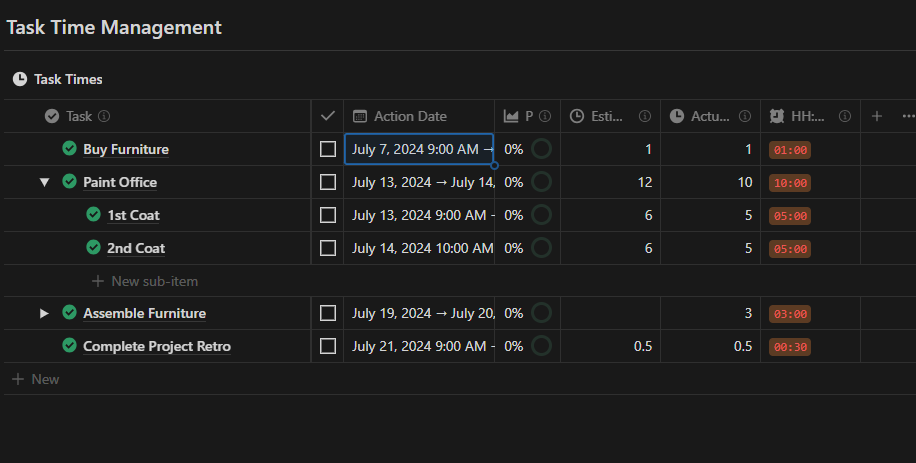
The properties I use for time management are part of my broader Notion workspace setup, which I explored in more detail here: My Notion Workspace methodology.
Here's the formula for actual time:
lets(
    child_under_24,
    prop("Child").map(current.prop("Duration")).filter(current < 24),
    grandchild_duration,
    prop("Grandchild").map(current.prop("Duration")),

ifs(
    prop("Duration") < 24 && prop("Duration") > 0,
    prop("Duration"),
    child_under_24.sum() + grandchild_duration.sum()
    ))
The Actual Time property references another formula property: Duration. Here is the formula for that property:
ifs(
prop("Action Date").empty(),
0,
round((dateBetween(dateEnd(prop("Action Date")), dateStart(prop("Action Date")), "minutes") /60) * 100) / 100
)
This formula gets the time between the start and end date in hours. If you're not overly familiar with Notion formulas, some of the maths and rounding here just ensure the final result displays with 2 decimal places, making the duration more readable.
I also added a qualifier for when the duration was 0 because Notion does not take any other values as empty or null for a numeric property. If the date was empty but the child dates were populated, the actual time would not populate.
I also added a qualifier for when the duration was 0 because Notion does not take any other values as empty or null for a numeric property. If the date was empty but the child dates were populated, the actual time would not populate.
HH:MM
I don't intuitively look at 0.75 and think that that's 45 minutes, so I wanted to create another property that formats this in a way that suits an expression of time. So I added a formula called HH:MM, and that just formats the total duration in hours and minutes.
Here is the formula:
if(
    prop("Actual Time").empty(),
    "",
lets(
    hours,
    prop("Actual Time").floor(),
    minutes,
    ((prop("Actual Time") - hours) * 60).round(),
    [
        hours < 10 ? "0" + hours : hours,
        minutes < 10 ? "0" + minutes : minutes
    ]
).join(":").style("c", "orange_background")
)
Estimated Time
I've also added a simple number property for estimated time. This is just a number property, and I use this to estimate how long I believe a task will take. I can then compare this to how long a task actually takes me to complete. A simple use case for the estimated time and actual time properties is that I have a duration report. The formula property in my task database compares the estimated and actual values for each task and tells me whether they were completed on time or not. This will be helpful if you're planning out future work on similar tasks. You can look back on these reports to reference how long it takes you to complete similar types of tasks.
Here is the formula:
ifs(
prop("Action Date").empty(),
0,
prop("Action Date").dateEnd() == prop("Action Date").dateStart(),
24,
round((dateBetween(dateEnd(prop("Action Date")), dateStart(prop("Action Date")), "minutes") /60) * 100) / 100
)
ifs(
prop("Action Date").empty(),
0,
prop("Action Date").dateEnd() == prop("Action Date").dateStart(),
24,
round((dateBetween(dateEnd(prop("Action Date")), dateStart(prop("Action Date")), "minutes") /60) * 100) / 100
)How Time Management Properties Can Help Inform Projects
The estimated and actual time properties really come into play when I'm reporting my project progress. So, as opposed to just using a rollup that looks at how many tasks are complete versus incomplete, I'm able to weight the tasks by time taken. So, I have the formula set up in such a way that when a task is done, it's recording the actual time taken to complete a task. Then, when a task is incomplete, it's referencing the estimated hours value. I found this really helpful because it means that I don't have to time block every individual task at the start of a project to get an accurate progress completion percentage. I can just add an estimated hours value and that will give me a rough idea of how far along in the project I am. Once I start completing tasks that have been time-bound, the formula is updating based on the actual time.
I went into more detail on how I use these time management properties to inform my project management approach here: Using Notion for Project Management.
Just to note on some of these formulas, it's possible there's some extra variables in here that I haven't tidied up. It's just how I rationalised the formula as I was working my way through solving the problem.
Here’s the formula for project progress:
lets(
    Tasks_Done,
    prop("Tasks").filter(current.prop("Status") == "Done" && current.prop("Parent").empty()).map(current.prop("Actual Time")).sum(),

    tasksNotDone,
    prop("Tasks").filter(current.prop("Status") != "Done" && current.prop("Parent").empty()),

    trackedTasksNotDone,
    tasksNotDone.filter(current.prop("Actual Time").empty().not()),

    totalTrackedTasksNotDone,
    trackedTasksNotDone.map(current.prop("Actual Time")).sum(),

    untrackedTasksNotDone,
    tasksNotDone.filter(current.prop("Actual Time").empty()),

    totalUntrackedTasksNotDone,
    untrackedTasksNotDone.map(current.prop("Estimated Time")).sum(),

    (Tasks_Done / (totalUntrackedTasksNotDone + totalTrackedTasksNotDone + Tasks_Done)* 100).round() / 100
)
The tasks overview property is another formula property in the project database. It gives you a more detailed view of your project progress. It shows you how many parent tasks are completed, your total tasks completed, the actual hours completed, and the estimated hours remaining. So it's using the same logic as the project progress property, but it's giving you a slightly more detailed report.
The last property to note in the project database is the Task Report property. So, this is really helpful at the end of a project if you're doing a project retro. It gives you the total times for your tasks by actual and estimated and gives you the percentage that were completed under the estimated hours. Then the task breakdown in that same property lists the tasks that were completed over the estimated time and under the estimate. It’s a useful report that gets generated for you automatically in this formula that you can use to reference and plan for future projects.
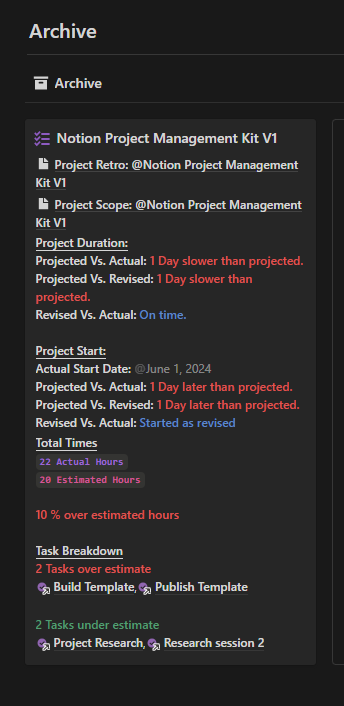
Here is that formula:
lets(
    Parriarch_Tasks,
    prop("Tasks").filter(current.prop("Parent").empty()),
    Total_Actual_Hours,
    Parriarch_Tasks.map(current.prop("Actual Time")).sum(),
    Total_Estimated_Hours,
    Parriarch_Tasks.map(current.prop("Estimated Time")).sum(),
    Percentage_Difference,
    (((Total_Actual_Hours - Total_Estimated_Hours) / Total_Estimated_Hours) * 100).round(),
    Tasks_Over,
    prop("Tasks").filter(current.prop("Actual Time") > current.prop("Estimated Time")),
    Tasks_Under,
    prop("Tasks").filter(current.prop("Actual Time")< current.prop("Estimated Time")),

    /*Total Times*/
    "Total Times".style("b", "u", "light_grey") + "\n" +
    /*Total Actual Hours*/
    (Total_Actual_Hours + " Actual Hours").style("b", "c", "purple") + "\n" +
    /*Total Estimated Hours*/
    (Total_Estimated_Hours + " Estimated Hours").style("b", "c", "pink") + "\n \n" +

    /*% Difference*/
    ifs(
        Percentage_Difference > 0,
        (Percentage_Difference + " % over estimated hours").style("b", "red"),
        Percentage_Difference < 0,
        (Percentage_Difference.abs() + " % under estimated hours").style("b", "green"),
        "equals estimated hours".style("b", "blue")
        ) + "\n \n" +

    /*Task Breakdown*/
    "Task Breakdown".style("b", "u", "light_grey") + "\n" +
    /*No. of Tasks Over*/
    (Tasks_Over.length() + " Tasks over estimate").style("b", "red") + "\n" +
    /*Tasks Over List*/
    Tasks_Over + "\n \n" +
    /*No. of Tasks Under*/
    (Tasks_Under.length() + " Tasks under estimate").style("b", "green") + "\n" +
    /*Tasks Under List*/
    Tasks_Under
)
You can feel free to try any of these formulas in your own system. They're also all available in my Project Management Kit 2.1.1, and it utilises all these properties and formulas in one cohesive project management system.
More from the Blog



Streamline Your Content Creation Process with the Content Management Kit
The Content Management Kit for Notion works as an all-in-one solution for content creation, organization, and collaboration.
Key Features:
Centralized Content Hub: Keep all your content ideas, drafts, and published pieces in one easily accessible location.
Intuitive Workflow Management: Seamlessly move your content from ideation to publication with a status tracking system and integrated automations
Generate New Ideas: Use the Brainstorm dashboard to leverage what you have to inspire new content
Iterate and Improve with Analytics Use the analytics dashboard and Notion's chart feature to vizualize your content's related today to improve over time.
Who Is This For?
Whether you're a solo content creator, a small business owner, or part of a large marketing team, the Content Management Kit is designed to scale with your needs. It's perfect for:
Bloggers and writers
Social media managers
Marketing teams
Content strategists
Anyone looking to streamline their content creation process
Leverage a host of other Notion features within this framework:
AI Assistance: Use Notion AI to suggest content ideas.
Integrated Automations: Simple automations to organise your content workflow and save you clicks.
Dark/Light Optimized: Like all Notion templates, this supports both light and dark modes
Completely Customizable: Tailor the kit to fit your unique content creation process
Information & Support Available
There's dedicated guides to take you through using the template as well as contextual information on every view and database property. If you have any questions, just reach out.
Note that some Notion features like AI & charts require a paid Notion plan to use their full functionality.