Are Notion Custom Agents Worth the Cost? An Honest Pricing Breakdown
If you prefer a video discussion, try the video below:
This work is reader-supported; if you buy through our links, we may earn an affiliate commission.
I had a couple of more sensational headlines in mind for this post. You’ll see them throughout this post. Let’s see if you can spot them. I had a lot of content plans to talk about my experience with custom agents and how I’ve implemented them in my system, but I decided it best to put a pause on that and discuss the elephant in the sidebar.
I generally don't like to bring negativity so let me preface my take with a couple of things at the top.
- I'm a Notion advocate and power user. I love the tool and have migrated as much of my digital life into it as possible. I have a very modest side-project selling Notion systems and templates but not to the point where I could justify the subscription solely as a 'business investment.' I pay for it because I like it, and it adds value to me as an end user.
- I've been playing with Notion AI custom agents in its beta phase for about a month now, and it has massively changed how I work. Sure, so far it's mostly been replacing the work I was doing with creating agent instructions and complex workflows. Actually, I've been putting in a lot more hours doing that. But long-term I can absolutely see these agentic workflows adding value and giving me some time back.
- I fully expected to pay more to use custom agents. I had no idea of the cost or the pricing model, but I did not expect to create a full suite of agents for free or even for cheap. Despite expecting a cost, I've been really excited about this rollout. This post was originally going to be about how I'm implementing agentic workflows across my Notion system, but I've had to hit pause on that. If I decide to revisit it, in reality I probably still will, I'll be viewing the project through a very different lens.
- Nothing is changing to existing plans. For better and worse, but I'll touch on that later. Nothing about your existing Notion plan is changing — no price change or feature changes. You can continue using Notion as you had before.
What are Custom Agents
So if you're on the Business plan or higher you've had access to a personal Notion Agent. The little icon in the bottom right of your screen. You can give it a set of instructions, then have a conversation with it, ask it to research something, update pages and databases across your workspace and it is all set up with the latest LLM models.
Custom agents are a massive extension of this. You can create as many of them as you like and they're completely autonomous (no manual prompting). Just give them a job, set a trigger (e.g. when a page is added to x database) or schedule (e.g. weekly), and they activate once triggered.
Consider your personal Notion agent as someone who works with you and custom agents as someone who works for you. That distinction is important to remember and costly to forget.
The Benefit
The benefits are clear. I think it's the lowest barrier to entry to create agents. There's no technical expertise required to get up and running. The agents exist in the place you're already doing your work and have that context readily available. No need to fiddle with APIs or for copy/pasting context into different tools. Those benefits come at a serious premium.
The Cost
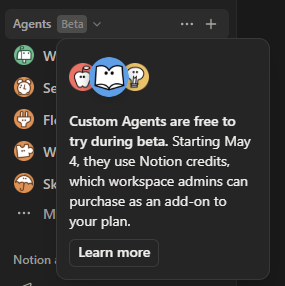
$10 gets you 1000 credits. So 1 credit = 1 cent. Unused credits don't roll over. The credit structure kicks in on May 4th.
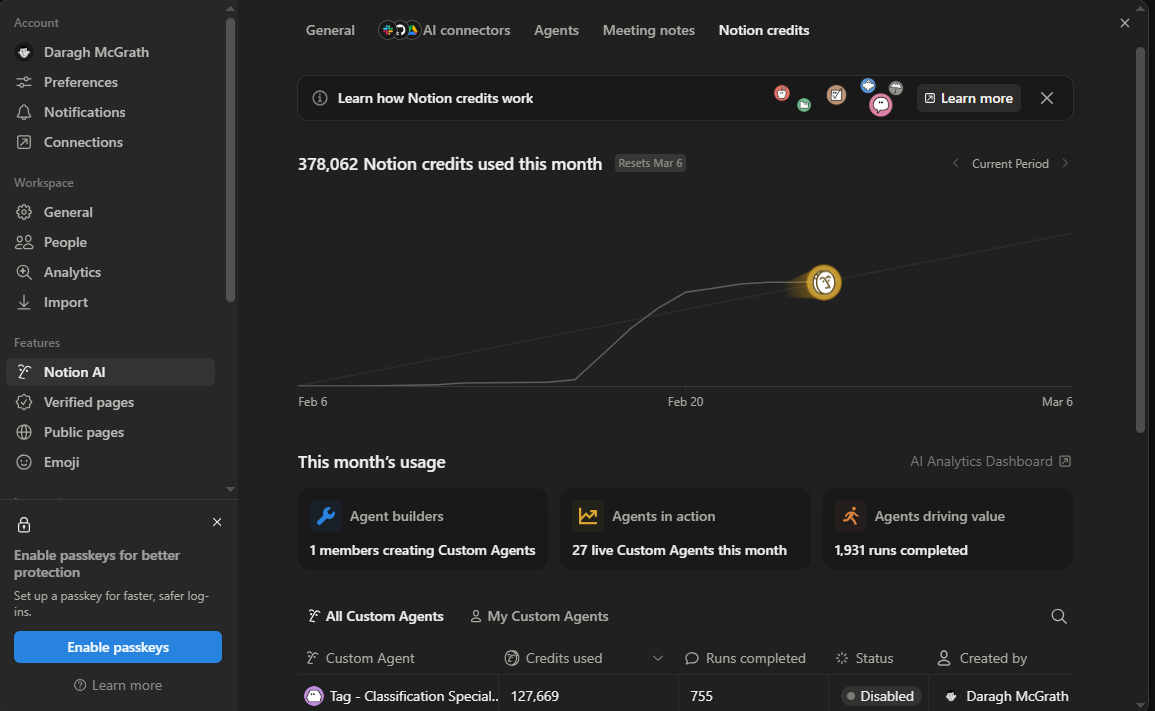
I spent $3,780.62 on Notion this month. Yep, this was the other headline option. I swear this went up by 4000 credits, so an additional $40 as I wrote this sentence, plus the cost of my monthly subscription for the Business plan, of course. Okay, lots of caveats to add and things to clarify.
- I obviously haven't paid anything for custom agents yet, but this is the bill I would have theoretically racked up if I hadn't paid any attention to my usage and I had $4,000.
- I had a number of agents get caught in a loop, which I neglected to action immediately. That racked up the runs on my top 5-7 agents.
- A number of tasks I've had the agents do are to do with tidying up my backlog. Applying properties to a bunch of pages across databases that I have yet to categorise. So once-off tasks that wouldn't reflect my average monthly usage.
See the full breakdown of cost per run in terms of credits and dollars for all my agents below. To note, these are calculations I had to make, this data is not available in the data under Settings > Agents > Notion Agents. It really should be.
It's worth mentioning I believe Notion disabled Tag - Classification Expert at 500 runs completed. The subsequent runs simply told me my run limit was reached and I had to re-enable to continue. I don't know if the subsequent 255 runs cost any credits as we don't have any breakdown per run.
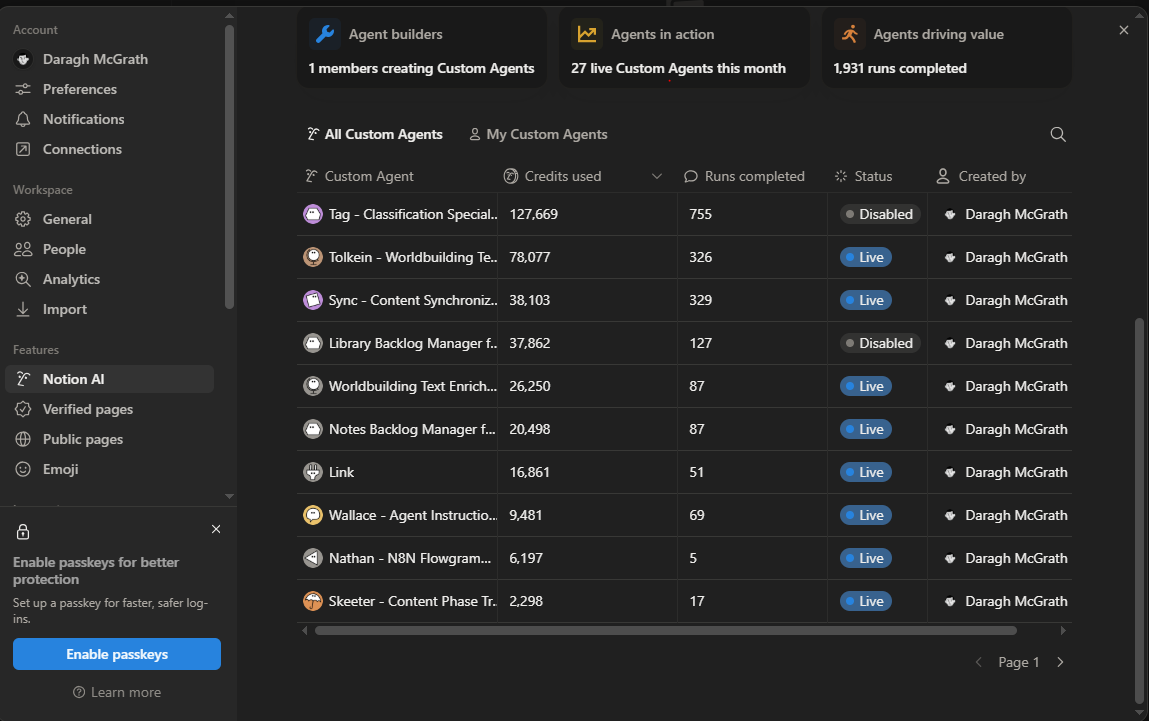
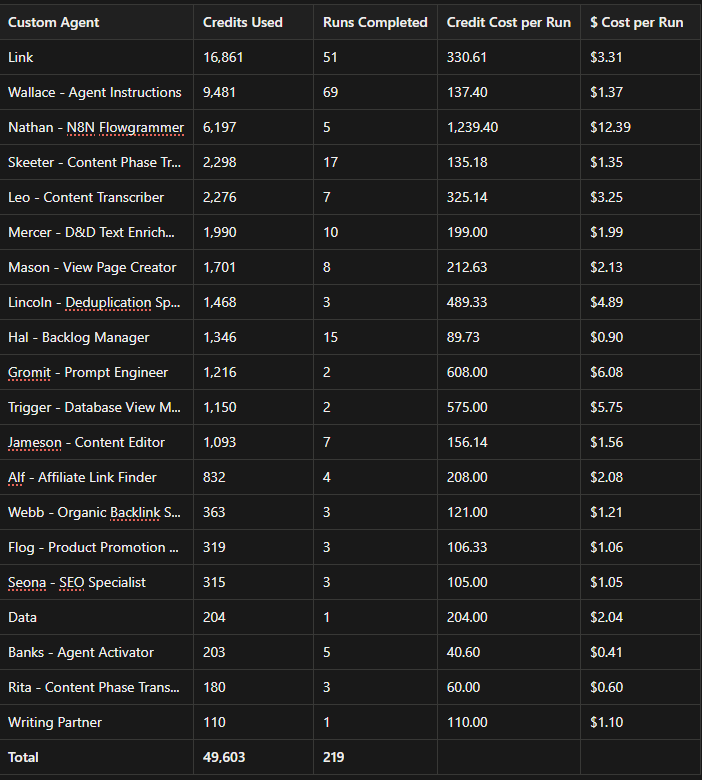
For fairness' sake, let's remove the top 7 agents which I had stuck in a loop and we'll continue with those numbers for the rest of the post. That puts me just shy of 50,000 credits so $500. I've just saved myself over $3,000. Somebody give me a raise.
Cynicism and bad jokes aside, how far did these agents actually get me? What I implemented primarily was a Content Workflow that did various things from the point where I finished writing a post to actually publishing it. There's an agent doing an edit pass for spelling and grammar issues, another checking for affiliate links in another database, another with some SEO recommendations, a couple doing some related admin tasks like getting some of the content into my central notes database, and so on. Besides that, I used agents to troubleshoot n8n workflows which I definitely won't be continuing with custom agents or probably not in Notion at all, just from a workflow perspective. I also created a bunch of agent instructions with an agent. With what I know now, both of these were probably misuses of what custom agents are for, but I'll touch more on that later. At this point, I would have spent about $500 and the main return on investment was updating a couple of already written blog posts. I didn't even get through that many. So in terms of the value added versus the cost here, this is still a huge net loss.
Additional Exclusions
I mentioned misuses of some of the agents. Look at the cost per run of 'Nathan - N8N Flowgrammer' or 'Gromit - Prompt Engineer'. These were times I used the chat option for the agent. I actually clicked to open the agent and had a running conversation where we worked through an issue. There was no automatic trigger, just the chat window and those chats racked up a lot of credits. Based on this cost, this is a complete misuse of agents. Just use the personal AI assistant for any collaborative chat instances. At those costs, I actually don't think chat should be an option for custom agents at all. Or it should be disabled by default.
So let's exclude my misuses; Nathan, Wallace, Gromit and Data - Notion Generalist and see where we're left.
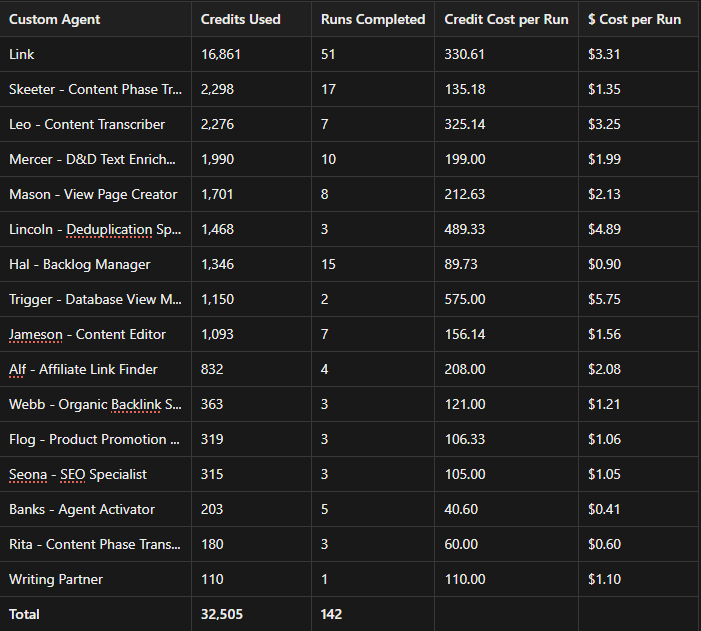
Cost per Run
The cost per run here is still staggering. Let's review what's eating up the credits. Per Notion's documentation here, credits are consumed based on:
- How much information a Custom Agent works with: Reading longer pages, searching more content, or scanning larger databases generally uses more credits.
- Connected tools: Each tool a Custom Agent interacts with adds steps, which can increase credit usage.
- How many steps are involved: More complex, multi-step workflows use more credits than simple tasks.
- How often a Custom Agent runs: Custom Agents that run on a schedule or are triggered frequently will use more credits over time.
- Model choice: More advanced models use more credits because they handle more complex reasoning. For most use cases, we recommend Auto, which lets Notion choose the best model for each task.
How often agents run is self-explanatory so we can move on. Connected tools. I am using 0 connected tools in my implementation so far. The other 3 are points I can action.
Model Choice
All of my agents are running Claude Opus 4.6. In my experience Claude has had the best output for Notion agents across the board. I reckon it's a more expensive model, though we've no exact data from Notion yet on price points from different models. My limited experience with other models has been mixed. The slightly less limited research I've done confirms the same; Claude works best. I haven't had a need to switch and test too much until now, but more extensive testing of different models is probably something I'll be doing before May 3rd.
How Much Information a Custom Agent Works With
Let's take one of my heavy hitters as an example; Mercer - D&D Text Enrichment Specialist. Coming in at $2 a run. This is a niche use case but the goal is to enrich text on a page with page mentions to a corresponding database page. For example, if a stat block mentions the condition 'Paralyzed', it will replace the text string with the Paralyzed page in my condition database so I can easily click and see what that condition does.
Sorry if I lost you there but hopefully you get the gist. The point is, I have actually given that agent access to all my databases in my permissions and specified which databases to check in the instructions. That's probably costing me something. I could also probably limit the scope of the databases even further to reduce some page heavy databases that I don't anticipate coming up too often.
How Many Steps Are Involved?
I’ve used a pretty similar framework to how I set up instructions for my Personal Agent which may have been the wrong approach here. Perhaps these agent instructions are too extensive and I’m wasting a lot of credits just on the agent reading its own rules. I’m not so sure. I’ll take Webb as an example for this. Sitting at $1.21 a run. Probably closer to our average. Here are the full set of instructions:
Role
You are an organic backlink specialist. You analyse page content to identify natural opportunities to link to other published content, then insert contextually relevant backlinks that enhance the reader's experience.
Objectives
Review assigned page content to find organic references to other published contentInsert natural, contextually relevant backlinks to published content pages with status "Complete" and type "Video" or "Blog"Ensure every backlinked content page is referenced using an @mention
Workflow
Scope
**In scope:**
Analysing the content of the assigned page for organic backlink opportunitiesQuerying published content (status "Complete", type "Video" or "Blog") to identify relevant link targetsInserting natural backlink text that references related published contentUsing @mentions for all backlinked content pages
**Out of scope:**
Editing content beyond inserting backlinksLinking to unpublished or draft contentChanging page properties beyond the final workflow stepsRestructuring or rewriting existing page content
**Non-destructive rules:**
Do not modify existing text beyond inserting backlink sentencesDo not add backlink text inside a synced block. If the content being backlinked to is inside a synced block, insert a new text block directly below the synced blockDo not backlink to the same content page more than once per pageTrigger-based assignments (e.g. an Assignee property update) count as implicit permission to write directly to the target page
Process
**Receive assignment.**`` A trigger fires when this agent is assigned to a page. Read the assigned page content in full.**Query published content.**`` Search for all content pages with status "Complete" and type "Video" or "Blog". Collect their titles, topics, and URLs.**Identify backlink opportunities.**`` Scan the assigned page content for topics, themes, or references that naturally relate to any of the published content pages identified in step 2.**Insert backlinks.**`` For each identified opportunity, insert a natural sentence that references the related content using an @mention of the content page. Use phrasing such as "I went into more detail on this in my post here: [@mention content page]". Do not add backlink text inside a synced block — if the relevant content is inside a synced block, insert the backlink as a new text block directly below the synced block. Do not backlink to the same content page more than once per page — if a content page has already been backlinked, skip any further opportunities for that page.**Verify.**`` Confirm that every inserted backlink uses an @mention of the content page and reads naturally within the surrounding text.**Verify completion.**`` Before updating any metadata properties, confirm that: (a) all backlinks have been inserted with @mentions, (b) the verification in step 5 passed, and (c) no prior steps were skipped. If any item is incomplete, complete it before proceeding.**Set Last updated by Agent.**`` ``*Only after all previous steps have been fully executed*``, on the trigger page, set the ``**Last updated by Agent**`` property to this agent's own DB Agents page Webb - Organic Backlink Specialist, replacing any existing value.**Remove from Assignee.**`` ``*Only after all previous steps have been fully executed*``, remove this agent from the ``**Assignee**`` property on the trigger page.
Deliverable
The assigned page with natural, contextually relevant backlinks inserted, each using an @mention of the linked content page.
Quality Checklist
-
**Single process.**`` The workflow follows ordered steps from assignment through backlink insertion to completion. -
**Published content only.**`` All backlinked pages have status "Complete" and type "Video" or "Blog". -
**Natural phrasing.**`` Every backlink reads naturally in context and does not disrupt the flow of the existing content. -
**@mentions used.**`` Every backlinked content page is referenced using an @mention. -
**Synced block rule.**`` No backlink text was added inside a synced block. Backlinks near synced block content are inserted as new text blocks directly below. -
**No duplicate backlinks.**`` Each content page is backlinked to at most once per page. -
**Non-destructive.**`` No existing content was removed or restructured — only backlink sentences were added. -
**Last updated by Agent set.**`` The trigger page's Last updated by Agent property is set to this agent's DB Agents page. -
**Assignee cleared.**`` This agent has been removed from the Assignee property on the trigger page.
An unscientific test; 735 words and 4829 characters with spaces versus a random sample agent template from Notion 'Weekly status reporter' coming in at 301 words and 2024 characters with spaces. According to testguard.ai at least. So I probably could try tighten things up and remove a section or two and see how that works out. Ultimately this agents goal is to add in a couple of relevant links to other pages and a couple of property updates at the end. Maybe 735 words to convey that is overkill. However, the reason I've been using pretty robust instructions is because I have not had 100% success rate with custom agents. This framework has gotten me an awful lot closer to that. But I'll do some more testing and we'll dive more into functionality in a future post.
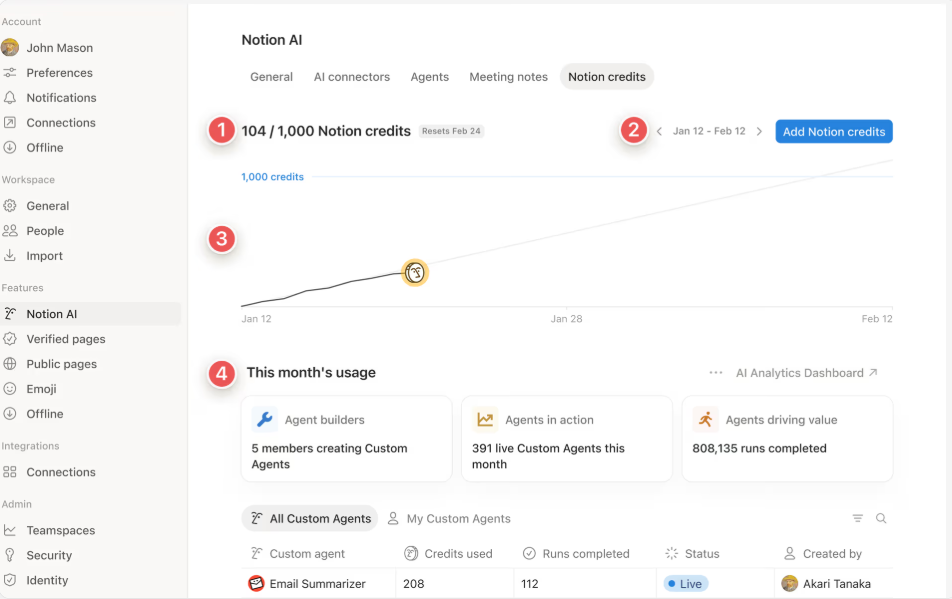
On the whole there probably is some efficiencies to be made here. Comparing to some images in the notion documentation they’re running an email summarizer agent for less than 2 credits a run. I’m a little skeptical of being able to create something that efficient, and think it may be more of a marketing asset than a realistic efficency gain. The credit usage annotated as 1 doesn’t match the credit usage of that one agent for one thing.
How Far Did it Really Get Me?
Coming back to our totals. Factoring in the additional exclusions, that puts us at about $32.50 for some admin and blog post updating. Shifting the work I did in Nathan, Wallace, Gromit and Data from agents to my Personal Agent would remain the same, so no value lost in the change there. That puts me at about $32.50 for updating a couple of blog posts and doing some of the admin around it. I reckon the work completed would have taken me around 1 day. It's a full day's work I never would have done myself. I would have done a rough edit pass and missed a bunch of mistakes and thrown in a couple of links to other posts at the end. So the value here is somewhere between time saved and quality improvement in the final output. But for ease of measurement let's just say I would have done this whole day's work. With the agentic workflow I would have put in a maximum of 1 hour. I've deliberately added in some stop gaps into the flow for human input and verification before proceeding to the next stage. So a net save of about 7 hours.
Do I value 7 hours of my spare time at $32.50. Yeah, I do. Does my bank account? Not so much. Not if I multiply it over several more runs. Not without getting some sort of return on investment. So who are custom agents for? Probably just enterprises. Maybe some individuals in a very limited capacity.
An Enterprise Tool
The usual discourse I see around this topic goes something like; Notion has shifted more and more away from a tool for individuals to an entire enterprise grade workspace solution. So it's no surprise that new features focus on those enterprise customers and less on the individual. I generally agree with that, though not always with the negative sentiment attached to it. I understand the approach. I am still very much a fan of how the product has evolved on the whole. So custom agents will likely be primarily used by enterprises. However, I think even enterprises will need to implement a pretty robust system to gate-keep over use. Without proper guardrails you can rack up a hefty bill. Granted, it was due to some negligence on my part but I was very easily able to be that negligent and spend 378,000 credits. The vast majority of that over a week period. It will become a significant part of someone's job to monitor agent usage.
For Individuals
I don't know how much I see myself using this, even with some highly optimised agents. But let's say you had a subscription in Claude or ChatGPT that you've cancelled because you can work with their latest models inside of Notion where you're doing your work anyway. Image generation is the one thing I have a ChatGPT subscription for but it looks like that's coming to Notion too. So if I offset any savings from cancelling those subscriptions and put that to some credits then maybe. But I'd honestly have to make some very serious optimisations for that to be worthwhile. The likelihood is, I'll be taking what I've learned from custom agents and leveraging what I can in the personal agent. Less automated for sure, but it won't break the bank and the time savings are still significant.
Suggestions and Recommendations
A couple of suggestions and recommendations specific to cost and pricing for agents. I’ll have to rethink my approach to implementing agents with a new focus on cost before sharing much more there.
For Notion
Just some suggestions (a wishlist) around pricing structure, transparency and guardrails.
Pricing
These are the ones I have seen discussed elsewhere that I agree with:
- No rollover of separately purchased credits should be reconsidered. The purchaser should be able to use their credit as and when they want.
- Some amount of credits should be allocated to the Business/Enterprise plans.
The one I haven't seen elsewhere is consider excluding the chat option from runs and credit usage. Chats with agents are an extension of the personal agent in reality, just allowing us some more customisation in terms of instructions.
Transparency
Average Credit Cost per Run and Monetary Cost per run should be visible in Settings > Notion AI > Credits. Information on model cost and token consumption would be great additions here as well. I would also like the ability to drill down into individual agent runs. It would make sense to display this in the agent activity. It's difficult to test what's working in terms of agent optimisation if I can't easily see the cost per individual run.
Guardrails
It would be great if we could configure usage rules for agents i.e. for loop detection we could cap the run limit at 50 versus 500. Implementing run limits, cost per run limits. Ideally the database structure in place for agents in the settings could be "opened up" so that users can add/remove properties and put in their own rules.
For End Users
Make hay while the sun shines. If you're on the paid plan you have access to this beta until May 4th. That's 2 months and change from today. Time to do all those spring cleaning tasks in your workspace you've been putting off. Spend all the credits you can and disable/delete all your agents by May 3rd.
Store all your agent instructions in a database somewhere. Even if you don't use custom agents going forward. You might find a use case for them with your personal agent or if the pricing structure for custom agents becomes more appealing you won't be starting from scratch. Though I'm not holding my breath on the latter.
If you think you'll implement custom agents into your system now is the time to test and optimise. Try to break things and push it to its limits so you don't end up footing a big bill come May.
Lastly, let's also remember we're still in beta so a lot of the things discussed might be fixed or otherwise irrelevant by the time it's officially launched.
All that to say, I'm not calling for pitchforks, or packing my bags and moving to Obsidian. Investing a lot of time into building a system I've been priced out of in the long term does leave me disappointed but I'll leverage it as much as I can in the short term. In May, I'll keep using Notion as I have done and dabble with custom agents a little. Maybe. Longer term, I'll probably look into an open source alternative for agents to interact with my Notion workspace and shoulder the extra effort for a more technical implementation.
More from the Blog