Show Multiple Layers of Sub-Items with Notion Automations
What It Does?
With Notion sub-tasks, every page in your database can have a Parent/Child relationship. Think of it like a folder inside a folder. A task might have a parent task, which itself may have a parent task (grandparent) and all of those tasks may be related to a larger project.
The Upstream Automation follows that chain of parents upward, one step at a time. It starts with the page that triggered it, looks at that page's parent, then looks at that parent's parent, and keeps going.
By the end, the automation can show every page that sits above the trigger page in the hierarchy. Similarly, it can also show every page that sits below the trigger page in the hierarchy. Whether your structure is 2 levels deep or 13, it captures the full chain of “ancestors” automatically.
Prerequisites
Before setting up the Upstream Automation, your database needs a few properties in place.
Parent and Child Relations
A two-way self relation property. This is a relation property created that points back to your task database. This will create 2 properties in your database. You can call one Parent and one Child. The Parent property links a task to the task above it, while the Child property links it to the tasks below it. Together, they form the hierarchy that the automation will traverse. These are the properties that you will use to "show sub-items" in your database settings.
Upstream and Downstream Relations
These are also relation properties that point back to the same database. The difference is that Parent and Child only track direct connections — one level up or down. Upstream and Downstream are where the automation writes its results: the full chain of ancestors or descendants, across all levels.
In my tasks database, the Upstream property stores every ancestor of a task, and Downstream stores every descendant. These properties start empty — the automation is what fills them in.
Access to Notion Automations
The formula runs inside a Notion automation, so you'll need access to automations on your plan which is a paid feature. However per Notion’s documentation:
Free Plan users can use existing automations in templates, but they won't be able to edit them.
Why Use an Upstream Automation
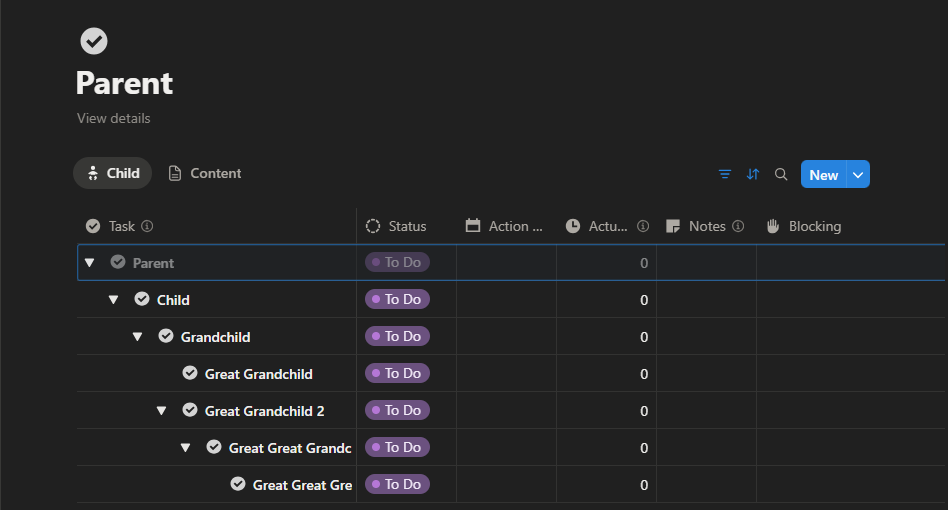
When I manage a project, I’ll create a task list with multiple layers of sub-tasks as some tasks may take place over a couple of days. Some nested sub-tasks may also just be quick reminders to make a small change before completion, so it’s common for me to have 2/3 layers of sub-tasks on project tasks. At the project level (on my project page) this works really well, as I have a clear view of all tasks and nested sub-tasks.
At the task level (opening an individual task page) is where we run into problems. I do 90% of my work from that project page but on occasion when I open a task page. These are templated pages with a database view of the tasks database filtered to show child tasks (sub-tasks) of the current (parent) task page. Ideally I would be able to see all layers of nested sub-tasks underneath that ‘parent-task’. However a database view can only filter by direct relations — meaning it can show a page's immediate children, but not its grandchildren or anything deeper. Notion's Rollup property can get you a level deeper but that may not always be enough. You can get there with Notion formulas but that can’t then be used as a filter for a database view.
The Upstream Automation fills in the gap. Every time a page is added to the database (and it has a parent), the automation runs the formula and writes every “ancestor” into that page's Upstream property. Your database view on the individual task page can filter for where Upstream contains "this page".
Use Cases
This automation can be used with any database that uses a Parent/Child hierarchy. Here are a few examples:
Tasks
Tasks is the obvious example we’ve used throughout. This means you can open any task and filter a view to show all nested sub-tasks beneath it, regardless of depth.*
Locations
In my worldbuilding system, for running TTRPG games I track locations hierarchically. Continent > Country > Region > City > Districts > Buildings > Interior. If I’m running a game within a city, I only need to have that page open to see all the layers of locations within that city. Really helpful for DMing as it’s very important I have the information I need to hand to not break the flow of the game.
Those are my two main use cases, but you could apply it to organisation structures, tags/categories, a course curriculum, family trees. Any hierarchical database structure you have in Notion would likely benefit from this.
*I have this automation configured to run for 13 layers of hierarchy. I haven’t needed close to that many levels of sub-items for tasks. I have come closer to the limit for locations, where I’ve locations from everything from worlds, down to the interior rooms of an inn in a remote village. Based on Notion’s documentation, you can technically go to 15 layers before running into issues:
Notion formulas can only be 15 layers deep. Every time a formula references another formula or rollup, it adds a layer. This applies even if the formula is in a different database.
When this limit is reached, Notion will show an error message.
Code
Here’s the full Notion formula code used to set the value for the Upstream property:
lets(
  /* Get the immediate parents (level 1) */
  parentsLevel1, context("Trigger page").prop("Parent"),

  /* Get parents of parents (level 2) */
  parentsLevel2, parentsLevel1.map(current.prop("Parent")).flat(),

  /* Get level 3 parents */
  parentsLevel3, parentsLevel2.map(current.prop("Parent")).flat(),

  /* Get level 4 parents */
  parentsLevel4, parentsLevel3.map(current.prop("Parent")).flat(),

  /* Get level 5 parents */
  parentsLevel5, parentsLevel4.map(current.prop("Parent")).flat(),

  /* Get level 6 parents */
  parentsLevel6, parentsLevel5.map(current.prop("Parent")).flat(),

  /* Get level 7 parents */
  parentsLevel7, parentsLevel6.map(current.prop("Parent")).flat(),

  /* Get level 8 parents */
  parentsLevel8, parentsLevel7.map(current.prop("Parent")).flat(),

  /* Get level 9 parents */
  parentsLevel9, parentsLevel8.map(current.prop("Parent")).flat(),

  /* Get level 10 parents */
  parentsLevel10, parentsLevel9.map(current.prop("Parent")).flat(),

  /* Get level 11 parents */
  parentsLevel11, parentsLevel10.map(current.prop("Parent")).flat(),

  /* Get level 12 parents */
  parentsLevel12, parentsLevel11.map(current.prop("Parent")).flat(),

  /* Get level 13 parents */
  parentsLevel13, parentsLevel12.map(current.prop("Parent")).flat(),

  /* Combine all parent levels into a single list */
  allParents, concat(
    parentsLevel1,
    parentsLevel2,
    parentsLevel3,
    parentsLevel4,
    parentsLevel5,
    parentsLevel6,
    parentsLevel7,
    parentsLevel8,
    parentsLevel9,
    parentsLevel10,
    parentsLevel11,
    parentsLevel12,
    parentsLevel13
  ),

  /* Return unique list of all parent locations */
  allParents.unique()
)
Code Breakdown
The formula uses lets(), which is Notion's way of defining temporary variables that build on each other. Think of it as a set of instructions that run in order, where each step feeds into the next.
The formula begins with context("Trigger page") — this tells it to start from whichever page just triggered the automation. From there, it reads the Parent property to get the page's direct parent. That's Level 1. Each subsequent level takes the previous level's result and does the same thing: grabs the Parent of each page in the list. It uses two functions to do this:
.map(current.prop("Parent"))— loops through every page in the current level and gets each one's parent.flat()— the Parent property is a relation, which returns a list. Mapping over a list of lists creates nested lists, so.flat()collapses everything back into a single flat list
This pattern repeats identically for all 13 levels. If a page has no parent at a given level, that level simply returns an empty list. Once all levels have been calculated, concat() merges them into one list. This gives you every ancestor across every level in a single place.
Finally, .unique() strips out any duplicate pages. This matters when a hierarchy has overlapping branches — where two different paths could lead to the same ancestor. You only need each ancestor listed once.
Wrapping Up
The Upstream Automation is a simple but powerful way to overcome one of Notion's key limitations with hierarchical data. With a single formula and an automation trigger, every page in your database gains full awareness of where it sits in the hierarchy.
Once it's running, you can build views that surface deeply nested pages from any level, making your databases far more flexible and easier to navigate. And because the formula is generic, it works with any Parent/Child structure — whether you're managing tasks, tracking locations, or organising anything else with layers. This automation is also fully integrated in my project management template, available in the Notion template store here.
More from the Blog